![abtrace-logo-colour@2x-3.png]](https://help.abtrace.co/hs-fs/hubfs/abtrace-logo-colour@2x-3.png?width=124&height=60&name=abtrace-logo-colour@2x-3.png)
Check out our our Analytics dashboards in User Management Portal here (beta), and read the help article here.
The Analytics View offers selected users to view insights into achievement tracking and utilisation of the Proactive Monitoring Tool, and the rules which are enabled at your practice. We suggest using this feature when looking at general trends over time, helping you stay up to date with your monitoring and targets.
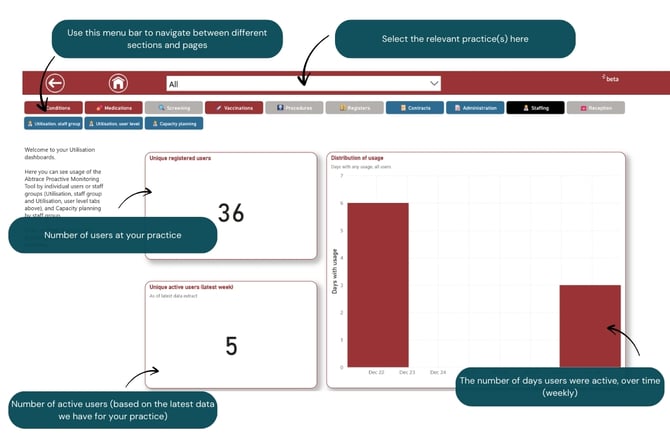
When navigating to the Staffing landing page, you will see a summary of the number of registered users, active users and distribution of weekly usage, at the selected practices.
In the menu bar, select the dashboard you'd like to explore in further detail.
We have dashboards covering the following Conditions (with more coming soon!):
Utilisation, staff group
The Utilisation dashboard gives an overview of usage of the Proactive Monitoring Tool at your practice(s).
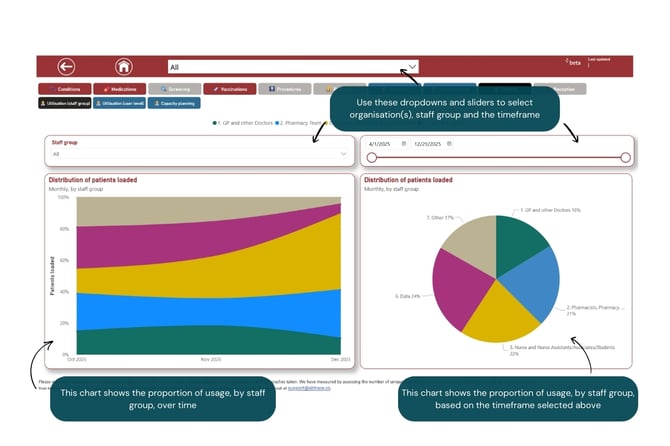
There are two charts, which show:
- Proportion of usage, by staff group, over time (this is based on the the Role defined by the user when creating their account)
- Proportion of usage, by staff group, based on the timeframe selected in the top right slider
Utilisation, user level
This gives an overview of utilisation of the Proactive Monitoring Tool, but at user level, including:
- Unique registered users: the number of Abtrace Proactive Monitoring Tool users registered, at your practice(s)
- Unique active users (latest week): the number of users who have been active on the Abtrace Proactive Monitoring Tool (based on the latest week of data we have for the practice - there can be a lag of around one week this)
- Utilisation by user: number of days (in the selected time period) individual users have been active on the Proactive Monitoring Tool
- Distribution of usage: number of days (in the selected time period) individual users have been active on the Proactive Monitoring Tool, over time. This may be useful to see if the number of days a user has been using the tool has been increasing or decreasing over time, and compared to other users in the practice.
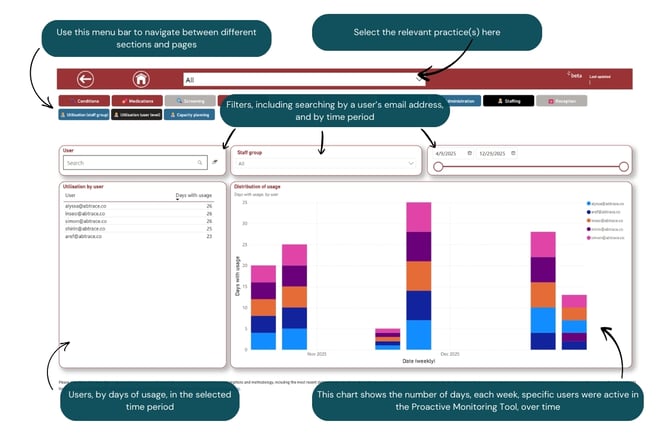
There are three filters:
- Organisation(s): for users who may have access to more than one practice, the practice of interest can be selected here (this is at the top of the page).
- Date: the time period of interest can be selected here. This will adjust all the visuals, except unique registered users.
- Staff group: based on information the user input when first registering an account with Abtrace.
Capacity planning
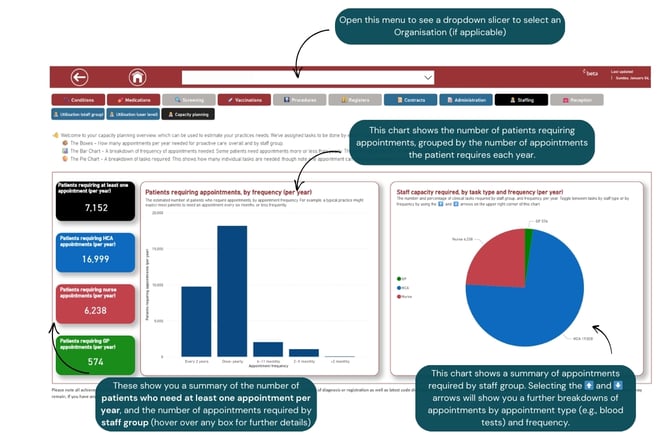
📆 Once a practice has configured which rules govern their proactive care, Abtrace is able to calculate for each patient how often they need each of an array of tasks (biometrics, blood tests, vaccinations, reviews…).
📌 Making some assumptions about which staff members can do which tasks, allows us to know which tasks can be done together in the same appointment, and which cannot.
|
Staff group |
Tasks we have assigned |
|---|---|
|
Healthcare assistants (HCA) |
Biometrics Blood tests ECG Foot check Urine tests Vaccines (influenza) |
|
Nurse |
Cervical screening Nurse reviews (diabetes (Enhanced LTC), asthma and COPD reviews) |
|
GP |
GP reviews (dementia; heart failure; learning disability; mental health (QOF) care plans/reviews |
🧪 A patient who needs blood tests twice a year (HCA), biometrics once a year (HCA), a cervical screen once every 3 years (nurse) and a mental health review once a year (GP) will therefore need 2 x HCA, 1 x nurse and 1 x GP appointment per year.
💡 We’re able to aggregate this for all patients to project overall how many appointments of each type are needed for a practice’s proactive care.
➕ You will find that if you turn on more rules (for example around blood test monitoring) your total number of required HCA appointments may increase.
🙌 We appreciate every practice will have slightly different ways of working, so whilst our groupings may not exactly match how your practice works, we hope it will still give a helpful estimation. We also love hearing your feedback, so feel free to get in touch at support@abtrace.co
We always love hearing feedback and suggestions - let us know here!