![abtrace-logo-colour@2x-3.png]](https://help.abtrace.co/hs-fs/hubfs/abtrace-logo-colour@2x-3.png?width=124&height=60&name=abtrace-logo-colour@2x-3.png)
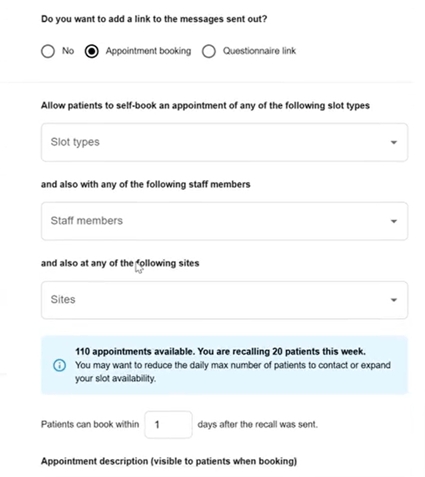
When setting up or editing a recall, you'll now see a live indicator showing how many appointment slots are available for the selected booking period. This means you can now instantly see how many booking slots are available for the selected period (for example, “next 96 days”) 📆
Why this matters?
Previously, it was unclear what appointment availability existed when a recall was sent. This could lead to:
-
Booking links with little or no capacity
-
Patients struggling to find an appointment
-
Additional and time consuming manual checks across calendars
Now, you can quickly and seamlessly see availability upfront to avoid these issues.
How it helps you
-
Validate appointment capacity before sending recalls ✅
-
Quickly adjust date ranges, calendars, or slot types if availability is low ✅
-
Reduce failed or frustrating booking experiences for patients ✅
What you’ll see in the Proactive Monitoring Tool
-
Available slot counts shown during recall and booking link setup
-
Slot availability displayed in slot-selection dropdowns
-
Clear warnings if availability is low or unavailable
-
Live updates as you change settings
If you’re recalling more patients than available appointments, we’ll flag it clearly - for example:
“42 appointments available. You're recalling 120 patients this week. You may want to reduce the daily max number of patients to contact or expand your slot availability.”
If no slots are available, you’ll see:
“No slots available for the selected period. You may want to expand your slot availability.”
Note: For EMIS users, only staff with slot availability in the next 7 days will be shown. Staff members without slot availability in the next 7 days won’t be visible.