![abtrace-logo-colour@2x-3.png]](https://help.abtrace.co/hs-fs/hubfs/abtrace-logo-colour@2x-3.png?width=124&height=60&name=abtrace-logo-colour@2x-3.png)
Patient Diary Entries help you record and manage future follow-up actions for individual patients directly within Abtrace.
They are useful when a patient needs something outside your practice’s usual monitoring schedule for example:
-
🩸 An HbA1c in three months following a diabetes review
-
🔬 An FBC every three months following specialist advice
-
🫀 A follow-up ECG in six months following GP advice
-
🦴 A one-off DEXA scan in 3 years following specialist advice
A Patient Diary Entry only records what a patient needs and when, but a separate automated recall is needed to contact them when the task becomes due.
Jump straight to:
How to create a Patient Diary Entry
From Patient View, open the relevant patient and:
-
Select Add Patient Diary.
-
Enter the reason for the diary entry.
-
Select the required task. This could be a blood test, biometric, imaging procedure, questionnaire or another clinical action.
-
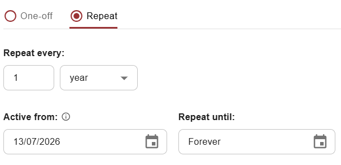
Choose whether the entry is one-off or repeating.
-
Add any relevant notes, such as details of the requesting clinician.
-
Confirm responsibility by selecting the declaration checkbox.
-
Save the diary entry.
If you are creating a repeating entry, you will also need to select:
-
How often the task should be repeated
-
The Active From date
-
The Repeat Until date, or Forever
Diary entries appear immediately in Patient View, however, the patient’s status (e.g. overdue or opportunistic) will update within 24-48 hours as per regular data refresh.
The difference between a one-off and recurring entry?
One-off entries
Use a one-off entry when the patient needs a task to be completed once by a particular date.
Examples include:
-
Lipid profile in three months following a statin initiation
-
Renal profile in two weeks following an ACE inhibitor or ARB change
-
TSH in three months following a levothyroxine dose change
-
HbA1c in three months following a change to diabetes treatment
When creating a one-off entry, you will need to select the date by which the task should be completed.
The status will then change as this date approaches:
-
Green: the task is not yet approaching its due date
-
Amber: one-third of the time between the entry’s creation date and due date has passed
-
Red: the due date has passed
For example, if an entry is created on 1 January and is due in one year, it will turn amber on 1 May.
For one-off entries, the patient’s previous last done date is not used to calculate the status.
Recurring entries
Use a recurring entry when the patient needs the same task at regular intervals.
Examples include:
-
PSA every six months, as advised by Urology
-
Annual lipid profile for a patient considered at high risk of cardiovascular disease
-
HbA1c every six months
-
Home blood pressure monitoring every four weeks
When creating a recurring entry, you can set:
-
Frequency: how often the task should be repeated
-
Active From: when Abtrace should begin monitoring the requirement
-
Repeat Until: when the recurring entry should end, or Forever
The Active From date defaults to today. Until this date is reached, Abtrace will ignore the diary entry. Once active, the patient’s status is calculated using their last done date and the selected frequency.
The Repeat Until date defaults to Forever. If you select an end date, the diary entry will be automatically deleted when that date is reached, regardless of whether the latest task has been completed.
A recurring entry turns amber when one-third of the monitoring interval has passed. For example, a task required annually will turn amber four months after it was last completed.
How do diary entries work with automated recalls?
Diary entries can be used within Abtrace’s existing searches and automated recalls.
For example, if you have a recall for patients who are due any blood test, a patient with a matching diary entry for a renal profile can be included when that test becomes due.
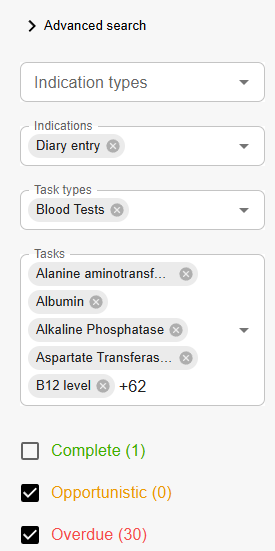
Alternatively, you can create an automated recall specifically for your diary entries. Search for Diary Entry under Indications, then select the relevant task type. For a blood test recall, select Blood Tests.
Patient Diary Entries are created and held within Abtrace. Existing diary entries from EMIS/SystmOne are not imported.
How to view and edit a Patient Diary Entry
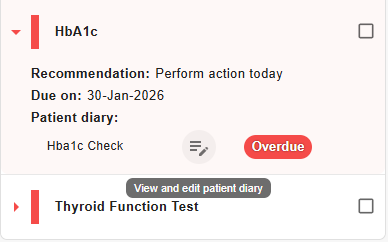
From Patient View, select the relevant task to expand it.
Diary entries are labelled with the indication Patient Diary and include a View/Edit button.
Select View/Edit to:
-
Review the full entry
-
Make changes
-
Delete the entry
Any changes will take effect following the next overnight data refresh.
How to view diary entries across your practice
To view Patient Diary Entries across your patient population:
-
Go to Population View.
-
Open the Indication filter.
-
Select Diary Entry.
You can then review patient-specific requirements across the practice and identify tasks that are becoming due or overdue.
Permissions and audit trail
Creating Patient Diary Entries requires an additional permission, which an administrator can grant through the User Management Portal in the Abtrace Web App. Find out how to grant permissions here.
Each diary entry includes an audit trail showing:
-
Who created or last updated it
-
When it was created or changed
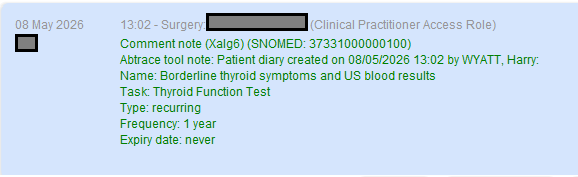
Whenever a Patient Diary Entry is created, edited or deleted, Abtrace also adds an entry to the patient’s notes in their EHR. This ensures that the requirement and any subsequent changes remain visible within the clinical record.
Patient Diary FAQs
-
Will adding a diary entry contact the patient? No. A matching automated recall must be set up before the patient can be contacted.
-
Will the patient be contacted as soon as the entry is overdue? Not necessarily. Timing depends on the recall’s filters, sorting and throttling settings.
-
When do changes to a diary entry take effect? After the next overnight data refresh. If a recall runs before then, it uses the patient’s status at the time of that run.
-
Will a questionnaire become available? Yes. If the diary entry makes a task opportunistic or overdue, any associated patient questionnaire becomes available as usual.
-
-
Can I create more than one entry for the same task?
Yes! You can create multiple diary entries for the same patient and task, allowing you to build a more flexible care plan.
For example, a patient could have:
- PSA monitoring every three months during the first year
- PSA monitoring every six months during the following year