![abtrace-logo-colour@2x-3.png]](https://help.abtrace.co/hs-fs/hubfs/abtrace-logo-colour@2x-3.png?width=124&height=60&name=abtrace-logo-colour@2x-3.png)
Your Encryption Keys allow the tool to securely connect to SystmOne and access your practice's data.
📌Note: This doesn't apply to all organisations - only some SystmOne setups require Encryption Keys.
What are Encryption Keys?
These are two unique 32-character codes used to securely link the tool to your SystmOne system. They're set up once and shouldn't normally need to change.
Where to find your Encryption Keys
You won't need to create new ones. You'll need to find the existing keys from your practice Admin. These are typically:
- Stored on your practice's shared drive
- Sent by email when the tool was first set up
⚠️Caution: Do not generate new Encryption Keys. Your keys must match the ones used on the gateway PC (where the pipeline was originally setup). Using different keys will break the connection to SystmOne.
How to update your Encryption Keys
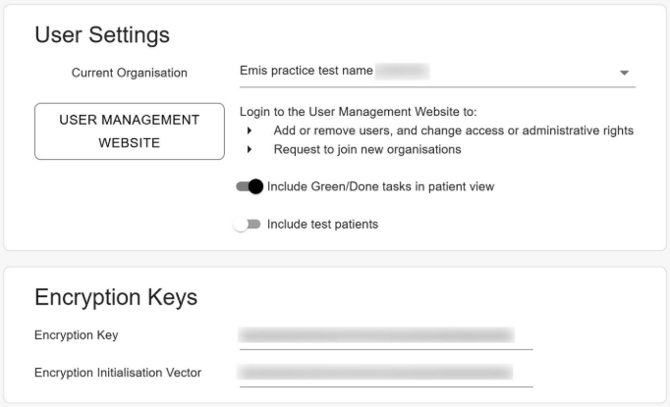
- In the Proactive Monitoring Tool, click your initials (top right) > Settings
- Scroll down to the Encryption Keys section
- Enter the 32-character keys from your shared drive or Administrator:
- Encryption Key
- Encryption Initialisation Vector
If completing these steps does not resolve the issue, please submit a Support Ticket via our Web App. Alternatively, you can email us at support@abtrace.co.