![abtrace-logo-colour@2x-3.png]](https://help.abtrace.co/hs-fs/hubfs/abtrace-logo-colour@2x-3.png?width=124&height=60&name=abtrace-logo-colour@2x-3.png)
Jump to:
Resolve the issue in Microsoft Edge
Resolve the issue in Google Chrome
Why am I seeing this message?
The User Management Portal requires permission to access your local network in order to connect to your Health and Social Care Network (HSCN).
If this permission is blocked, the portal may not load correctly and you may see one or more of the following errors:
-
Abtrace is blocked from using your Health and Social Care Network
-
Unable to load applications for user: Network Error
-
Unable to find the latest release of the tool: Network Error
How to resolve the issue
The steps required depend on the browser you are using.
Microsoft Edge
If you see the prompt below, additional configuration may be required in Microsoft Edge.
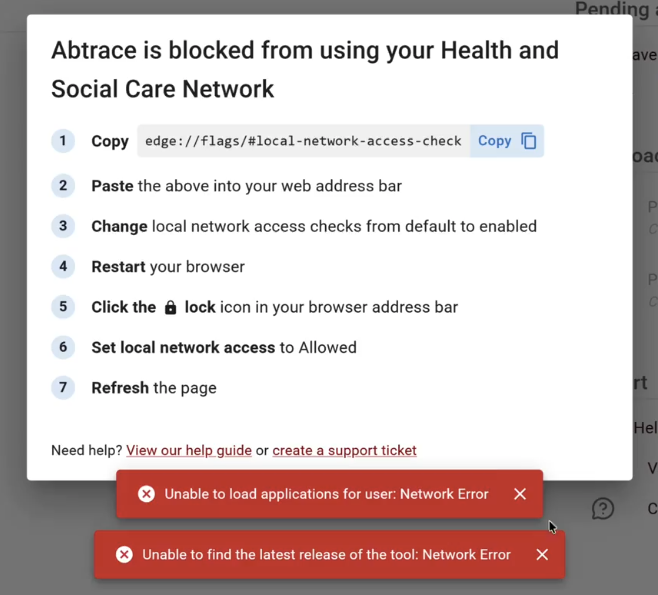
Follow these steps:
- Copy the link provided in the pop-up.
- Paste it into your browser address bar and press Enter.
- Change local network access checks to Enabled.
- Restart your browser.
- Return to the User Management Portal.
- Click the lock icon next to the website URL.
- Set local network access to Allowed.
- Refresh the page.
Once local network access is allowed, the User Management Portal should load and function as expected.
⚠️Important: After enabling the broswer setting, you must allow local network access in the website permissions. Many users miss this step which prevents the User Management Portal from loading correctly.
Prefer a guided walkthrough? Watch the video below:
Google Chrome
Chrome users will see a pop-up similar to the example below:
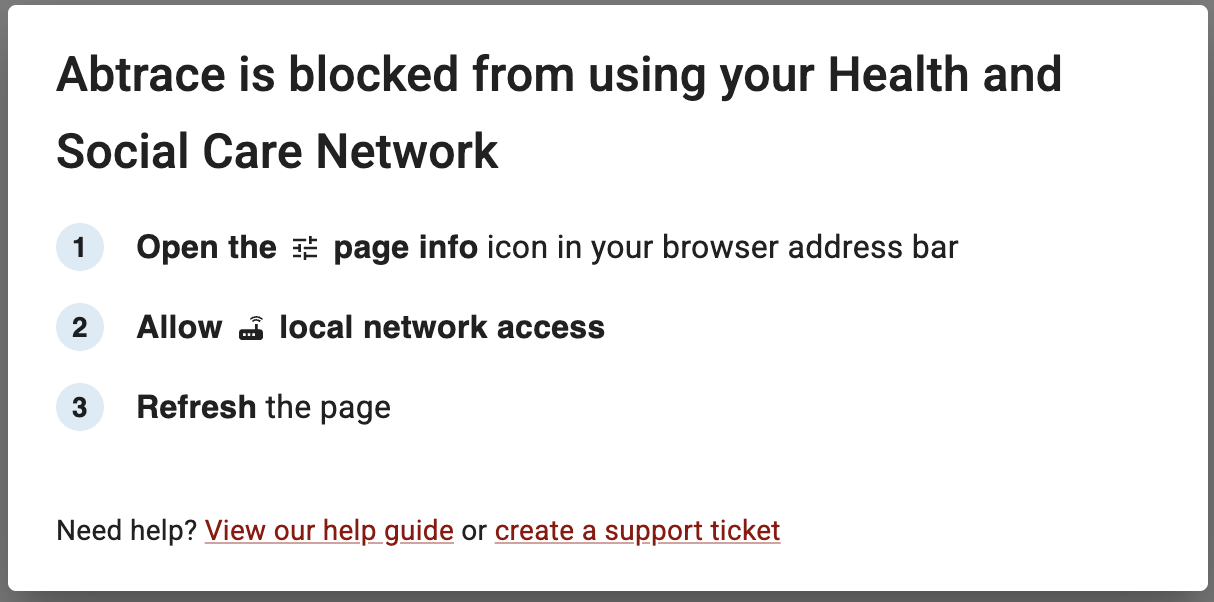
- Open the page info (lock/settings) icon in your browser address bar.
- Allow local network access
- Refresh the page.
Once local network access is allowed, the User Management Portal should load and function as expected.
Still having issues?
If completing these steps does not resolve the issue, please submit a Support Ticket via our Web App. Alternatively, you can email us at support@abtrace.co.