![abtrace-logo-colour@2x-3.png]](https://help.abtrace.co/hs-fs/hubfs/abtrace-logo-colour@2x-3.png?width=124&height=60&name=abtrace-logo-colour@2x-3.png)
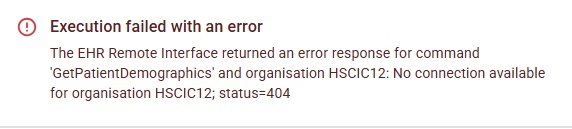
A recall may fail with this error when the Proactive Monitoring Tool can't connect to SystmOne on the PC where the pipeline is setup on (this may be the Gateway machine or another PC).
What you'll see
Jump to:
Reasons automations fail
Ensuring automations run successfully
Advanced Automation API
Example scenario
Need help?
Reasons automations fail
Each time an automation is scheduled to run, Abtrace tries to connect to the Proactive Monitoring Tool installed on your gateway computer. Without this connection, the recall can't run.
⚠️ An automation may fail if:
- The Abtrace tool is not running.
- SystmOne is not running/ not logged into.
- The gateway computer is shut down or disconnected.
When this happens, the system logs the failure with a corresponding error message.
Ensuring automations run successfully
To prevent failures, ensure the following:
-
The Abtrace Proactive Monitoring Tool is running on the gateway machine at the scheduled time.
-
SystmOne is active and has been logged into on the same machine.
Advanced Automation API
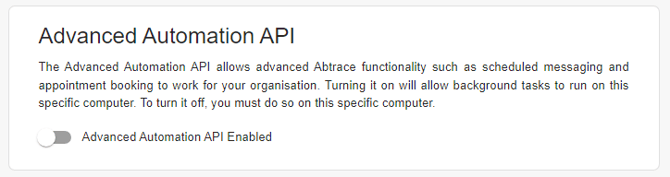
Keeping the gateway PC on at all times isn't always possible. The Advanced API adds a backup, so automations can still run through other computers if the gateway machine is temporarily unavailable.
💡 We recommend enabling this on as many computers in the practice as possible.
To enable it, on each computer with the Proactive Monitoring Tool is installed:
-
Click your initials in the top-right corner of the tool.
-
Go to Settings.
-
Toggle “Advanced Automation API” to On.
Example Scenario
- The automation is set to run through the gateway computer.
- The Advanced Automation API is also enabled on two other users' computers: Bob's and Mary's.
What happens:
- The automation triggers, but the gateway computer is off. It fails there.
- The system checks Bob's computer - also off, as Bob doesn't work Fridays. It fails again.
- The system checks Mary's computer. She's online, with Abtrace and SystmOne both running.
- Success - the automation runs through Mary's machine.
ℹ️ Need help? If completing these steps does not resolve the issue, please submit a Support Ticket via our Web App. Alternatively, you can email us at support@abtrace.co if you need support re-running failed automations after enabling the Advanced Automation API.