![abtrace-logo-colour@2x-3.png]](https://help.abtrace.co/hs-fs/hubfs/abtrace-logo-colour@2x-3.png?width=124&height=60&name=abtrace-logo-colour@2x-3.png)
A recall may fail with this error when one or more appointment slot types configured for self-booking are no longer available in the EHR (EMIS or SystmOne). This can happen if a slot type has been renamed, removed, or is no longer accessible.
What you'll see
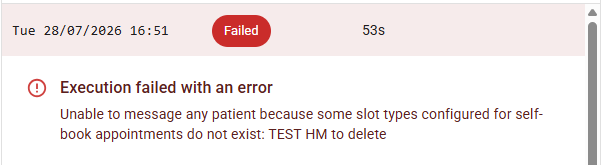
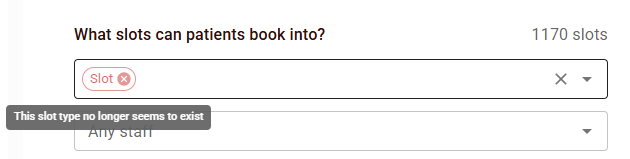
An execution failure explaining that the recall was unable to message patients because a configured slot type no longer exists in EMIS or SystmOne. This happens when the slot type has been deleted or renamed in the EHR.
How to fix
-
Open the Web App and select your organisation.
-
Navigate to Automated Recalls.
-
Select the affected recall.
-
Under the Configuration tab, review the selected appointment slot types.
-
Confirm the slot types still exist in the EHR.
-
Remove or replace any deleted or renamed slot types.
-
Save the recall.
ℹ️ Note: After updating the recall configuration, the changes will take effect on the next scheduled recall run.
Still Having Issues?
If completing these steps does not resolve the issue, please submit a Support Ticket via our Web App. Alternatively, you can email us at support@abtrace.co.