![abtrace-logo-colour@2x-3.png]](https://help.abtrace.co/hs-fs/hubfs/abtrace-logo-colour@2x-3.png?width=124&height=60&name=abtrace-logo-colour@2x-3.png)
Check out our our Analytics dashboards in User Management Portal here (beta), and read the help article here.
The Analytics View offers selected users to view insights into achievement tracking and utilisation of the Proactive Monitoring Tool, and the rules which are enabled at your practice. We suggest using this feature when looking at general trends over time, helping you stay up to date with your monitoring and targets.
When navigating to the Contracts landing page, you will see a summary of the rules enabled for the selected practice(s), and the conditions covered by these rules.
In the menu bar, select the condition you'd like to explore further with a detailed dashboard.
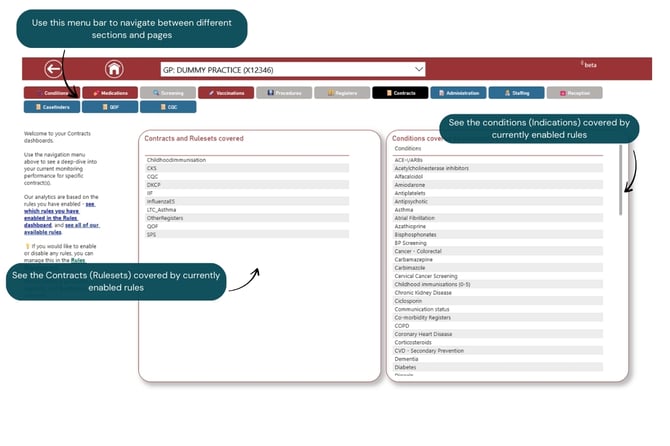
We have dashboards covering the following Contracts (with more coming soon!):
Casefinders (Optimisation)
Our casefinders dashboard offers an overview of recommendations in the Optimisation View which have been accepted, rejected or pending action. This can be reviewed by optimisation group, and by (selected) practices.
.jpg?width=670&height=447&name=Casefinders%20(Optimisations).jpg)
%202.jpg?width=670&height=447&name=Casefinders%20(Optimisations)%202.jpg)
QOF
Our QOF dashboard offers an overview of performance across QOF domains. The charts show performance over time, for the QOF indicators selected from the dropdown filters.
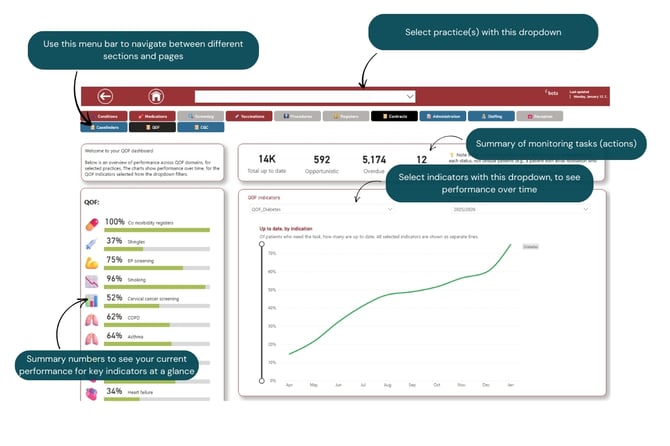 The first chart shows each selected indicator (group) as one line - multiple indicators can be selected to compare performance.
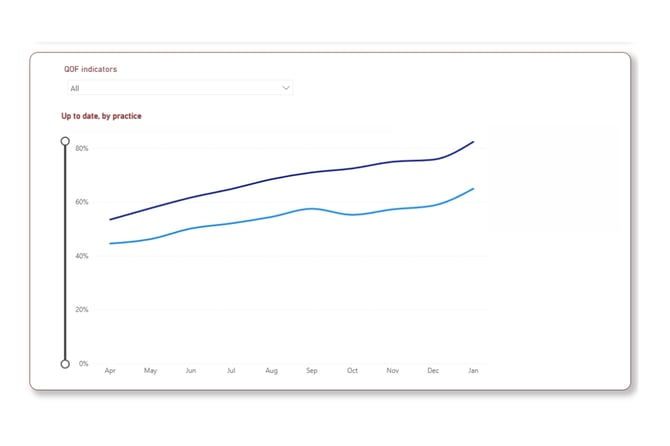
The second chart shows each practice as one line - multiple practices can be selected to compare performance.
CQC
Our CQC dashboard offers an overview of performance across CQC domains. The charts show performance over time, for the indicators selected from the dropdown filters.
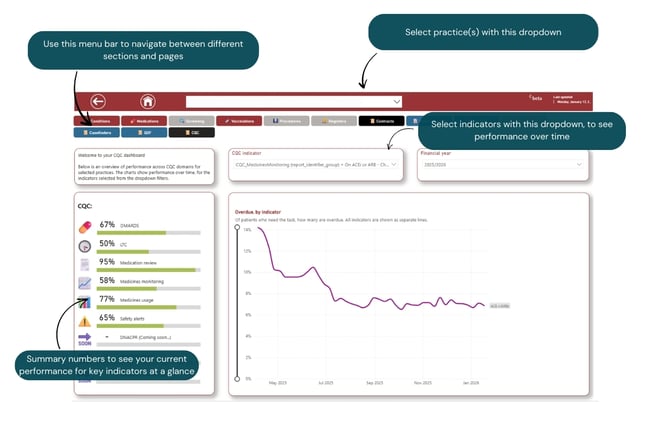 There are four charts showing performance over time - scroll down the page to review these:
- Overdue (red), by selected indicator(s), all selected practices - each line represents an indicator (group)
- Opportunistic (orange), by indicator(s), all selected practices - each line represents an indicator (group)
- Overdue (red), by indicator(s), by practice - each line represents one practice
- Opportunistic (orange), by indicator(s), by practice - each line represents one practice
We always love hearing feedback and suggestions - let us know here!