![abtrace-logo-colour@2x-3.png]](https://help.abtrace.co/hs-fs/hubfs/abtrace-logo-colour@2x-3.png?width=124&height=60&name=abtrace-logo-colour@2x-3.png)
⚙️ Associated Monitoring Rules
To use the Physical Activity Questionnaire effectively, the relevant monitoring rules associated with Physical Activity as a task must be enabled. To enable the monitoring rules:
- Go to the User Management Portal.
- Navigate using the left-hand panel to Rules Management.
- Search for "Physical Activity".
- ✅ Enable the rules that will allow you to identify patients that you want to record their Physical Activity level.
📋SNOMED codes saved to EHR
|
895951000000106 |
General Practice Physical Activity Questionnaire declined (situation) |
|
366121000000108 |
General practice physical activity questionnaire physical activity index: inactive (finding) |
|
366171000000107 |
General practice physical activity questionnaire physical activity index: moderately inactive (finding) |
|
366211000000105 |
General practice physical activity questionnaire physical activity index: moderately active (finding) |
|
366241000000106 |
General practice physical activity questionnaire physical activity index: active (finding) |
How the Physical Activity Index is calculated
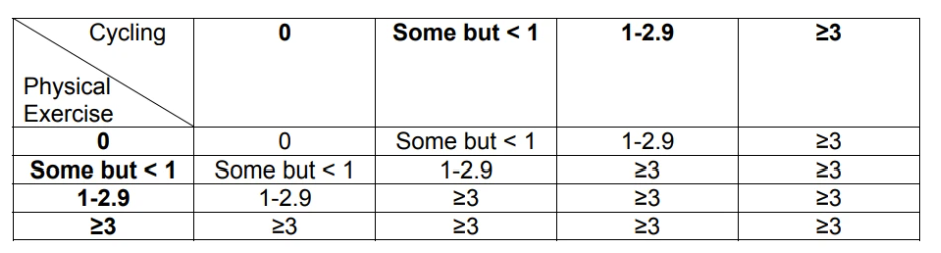
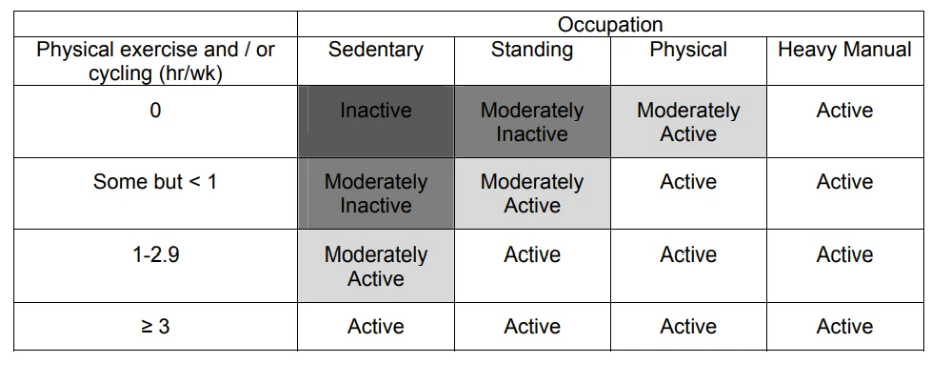
The index value is determined in two steps based on the General Practice Physical Activity Questionnaire (GPPAQ) guidelines.
Step 1: Combining the responses for hours spent on physical exercise and cycling according to the following table:
Step 2: Based on the calculation in Step 1 and the patient’s response on physical activity at work, the Physical Activity Index is determined according to the following table:
❓ Want to Understand How Questionnaires Work?
If you're looking to understand how Questionnaires operate more generally, check this help article.