![abtrace-logo-colour@2x-3.png]](https://help.abtrace.co/hs-fs/hubfs/abtrace-logo-colour@2x-3.png?width=124&height=60&name=abtrace-logo-colour@2x-3.png)
This functionality helps practices simplify data collection, reduce admin workload, and improve patient engagement. Making it easy for patients to share important health information from home.
Key Features
-
Send to individuals: Message a patient with a link to a selected questionnaire
-
Send to groups: Bulk-send a questionnaire link to multiple patients at once
- Automated recalls: Set up automated messages so patients are prompted to complete a questionnaire
⌛️ Take a look at our full list of available questionnaires
How it works
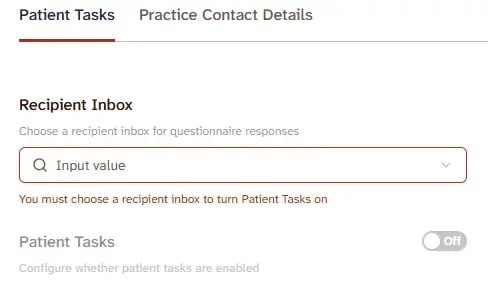
To enable Patient Tasks and Questionnaires:
- Go to the User Management Portal.
- Open the Patient Portal section.
- Click on the Recipient Inbox tab and select the NHS email address where completed questionnaire responses should be sent. This can be a shared Organisation Email used by your practice.For guidance on adding an Organisation Email to Abtrace, read this support article.
- Once the email address has been selected, turn the main Patient Tasks switch on.
The main Patient Tasks switch allows you to enable or disable all patient tasks and questionnaires at once. Beneath it, you’ll find a searchable library of all available tasks, each with its own on/off switch.
📖 For guidance on managing individual Patient Tasks and Questionnaires, including choosing whether patients complete a questionnaire or receive instructions, read this support article.
To send a questionnaire:
-
In the Proactive Monitoring Tool, select the patient or group of patients you would like to send the questionnaire to
-
Click on ‘Message’ and select ‘Include a questionnaire link’
-
Choose from the drop-down list
-
Send it to an individual or a group

Adding Questionnaires to Automated Recalls:
Including questionnaires in your automated recalls can help you stagger response volumes and proactively identify patients who may benefit from completing a questionnaire.
To add a Questionnaire to an Automated Recall:
-
- In the Proactive Monitoring Tool, navigate to the Population View.
- Use the left-hand column to apply your desired filters (e.g., Indications, Tasks etc.)
- Click + Add Recall.
- As you complete the setup steps, go to Section 5: Direct Links.
- Select ‘Questionnaire Link’, then choose the questionnaire you'd like to include from the drop-down menu.

What Patients will see:
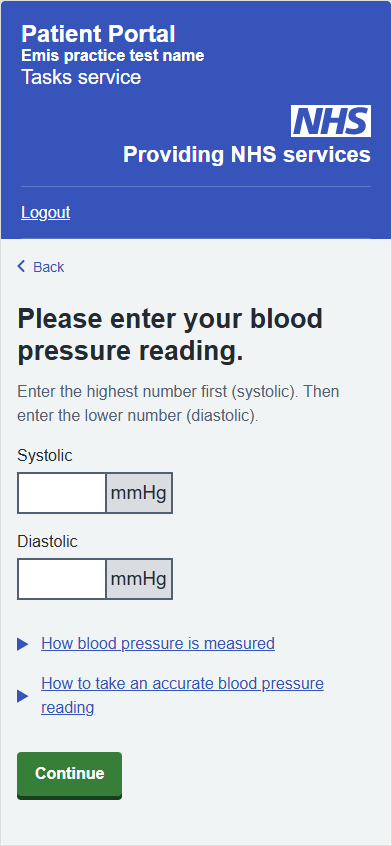
Patients receive a secure message with a link to their questionnaire.
-
Easy access: Patients verify their date of birth before starting
-
Designed for mobile: Fast and easy to complete on any device
-
NHS-branded experience: Styled to match NHS standards for trust and familiarity
Receive responses:
-
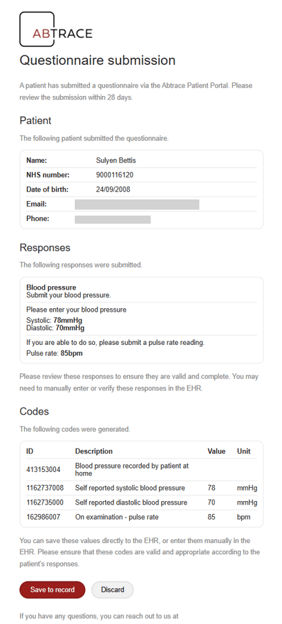
You’ll receive an email with the following subject line:
- Questionnaire submission for "Blood pressure" by [Patient Name] (NHS Number) - please review
-
This email will include the response and options to ‘Save to record’ or ‘Discard’ at the bottom
-
Clicking ‘Save to record’ will automatically save and code the information into EMIS or S1 and you’ll see a confirmation screen
-
The outstanding task status will automatically update in the Proactive Monitoring Tool
💡Top Tip: Organise your inbox by setting up Microsoft Outlook Rules
Use Outlook rules to automatically move questionnaire responses into dedicated folders, helping you keep your inbox tidy and making responses easier to review.
➡️ To get started, create folders in Outlook first, then set up rules based on keywords in the subject line or sender address.
Important Notes:
-
Patients can only open a questionnaire if they are eligible for a task linked to an enabled rule, and the task appears as opportunistic or overdue. For further help on this, browse our full list of questionnaire-specific support articles here.
-
Only one questionnaire per patient can be sent at a time but patients are able to view all eligible questionnaires in the Patient Portal.
-
If a patient doesn’t meet the criteria, they’ll still receive the message but will not be able to access the questionnaire. A message will explain that the questionnaire is no longer needed.
Good to know: Questionnaire responses need to be saved within 28 days. After this time, the patient's information won't be available. If it isn't saved within this period, you'll see an error message when saving to record and the patient will need to resubmit their responses.
📬 You can choose from a range of questionnaires including:
🔎 To preview how each questionnaire appears to patients, click the questionnaire name above - You’ll also see how it’s saved to the record and which rules should be enabled.