![abtrace-logo-colour@2x-3.png]](https://help.abtrace.co/hs-fs/hubfs/abtrace-logo-colour@2x-3.png?width=124&height=60&name=abtrace-logo-colour@2x-3.png)
This error is typically related to how your EMIS permissions or role profile have been configured. It can happen when required RBAC codes are missing or if your smart card role profile is not set correctly.
🔧How to Fix
Ask an EMIS user with permission to amend user profiles to check the following:
- Click EMIS Ball
- Go to Configuration → Organisation Configuration
- Search for the user (top left)
- Select the user to open the Edit User window
- Select User Role Profiles from the left-hand menu
Then ensure:
- The smart card role profile is ticked as the default in EMIS
- The selected role profile includes the required RBAC codes:
-
- B8029
- B0360
- B0380
ℹ️ Note: it can also help to deactivate and reactivate the EMIS application:
-
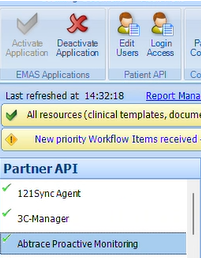
System Tools > EMAS Manager > Partner API
-
Select Abtrace Proactive Monitoring
- Click Deactivate Application and then Activate Application
If the issue persists after these checks, please contact your practice's Registration Authority (RA) to review your access. As your role is linked to a smart card profile, the RA may need to update the RBAC codes assigned to your smart card.
Checked the above steps and still having issues? Please contact our team at support@abtrace.co.