![abtrace-logo-colour@2x-3.png]](https://help.abtrace.co/hs-fs/hubfs/abtrace-logo-colour@2x-3.png?width=124&height=60&name=abtrace-logo-colour@2x-3.png)
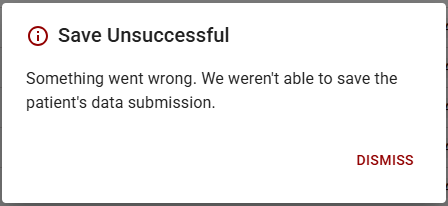
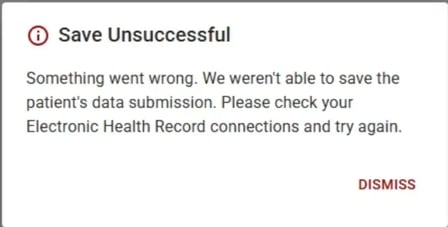
This error appears when a questionnaire response can't be saved to the patient's record. There are two versions of this error, depending on the cause.
For more information, jump to:
Something went wrong (EMIS & SystmOne)
This is usually caused by a network error or something unexpected.
What you'll see
How to fix
- Wait a moment, then try saving the questionnaire response again.
- If the error persists, contact us.
No connection to the EHR (SystmOne only)
This is usually caused by a temporary network issue.
What you'll see
How to fix
-
Check SystmOne is running. Confirm SystmOne is open on the Gateway PC, and that it's the same instance the pipeline was originally set up on. Also confirm the Abtrace tool is running on the same Gateway PC.
-
Check the correct organisation is selected. The same organisation must be selected in both SystmOne and the Tool - a mismatch here can cause this error.
-
Confirm the correct Proactive Monitoring Tool is installed for your EHR. Go to the Web App and check the Downloads section for the installer matching your clinical system (EMIS or SystmOne). Watch a quick video walkthrough to follow the steps.
-
Check the connection hasn't been refused in SystmOne. See how to approve the connection if it's been refused.
-
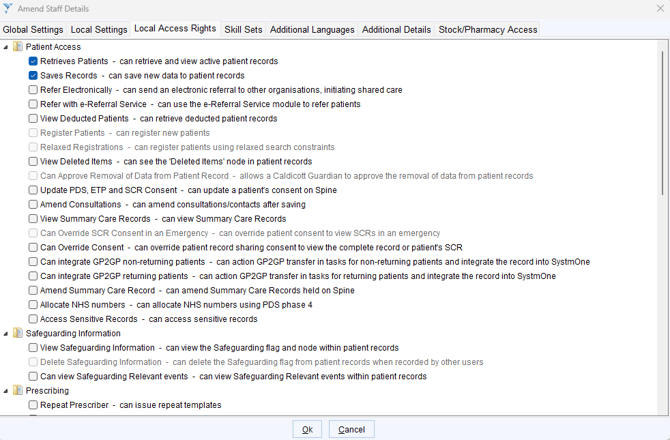
Check SystmOne permissions for the user logged in to the pipeline setup PC.
-
-
Log into SystmOne (pipeline setup PC)
-
Go to Amend Staff Details > Local Access Rights
-
Confirm the user has both of the following ticked:
-
Retrieves Patients
-
Saves Records
-
-
Still Having Issues?
If completing these steps does not resolve the issue, please submit a Support Ticket via our Web App. Alternatively, you can email us at support@abtrace.co.